● CERTIFICATION MANAGEMENT

Certification tracking software, from issuance through renewal.

edaxu delivers your training and tracks the certificates it awards. Issue verifiable certificates, set expiration and renewal policies, send reminders, and preserve each learner's award history.

No credit card required. Plans from $1,000/month.

Training providers Professional associations Internal training teams
THE NEXT CYCLE, WITH THE HISTORY INTACT

A renewal should add a record. Keep the original.

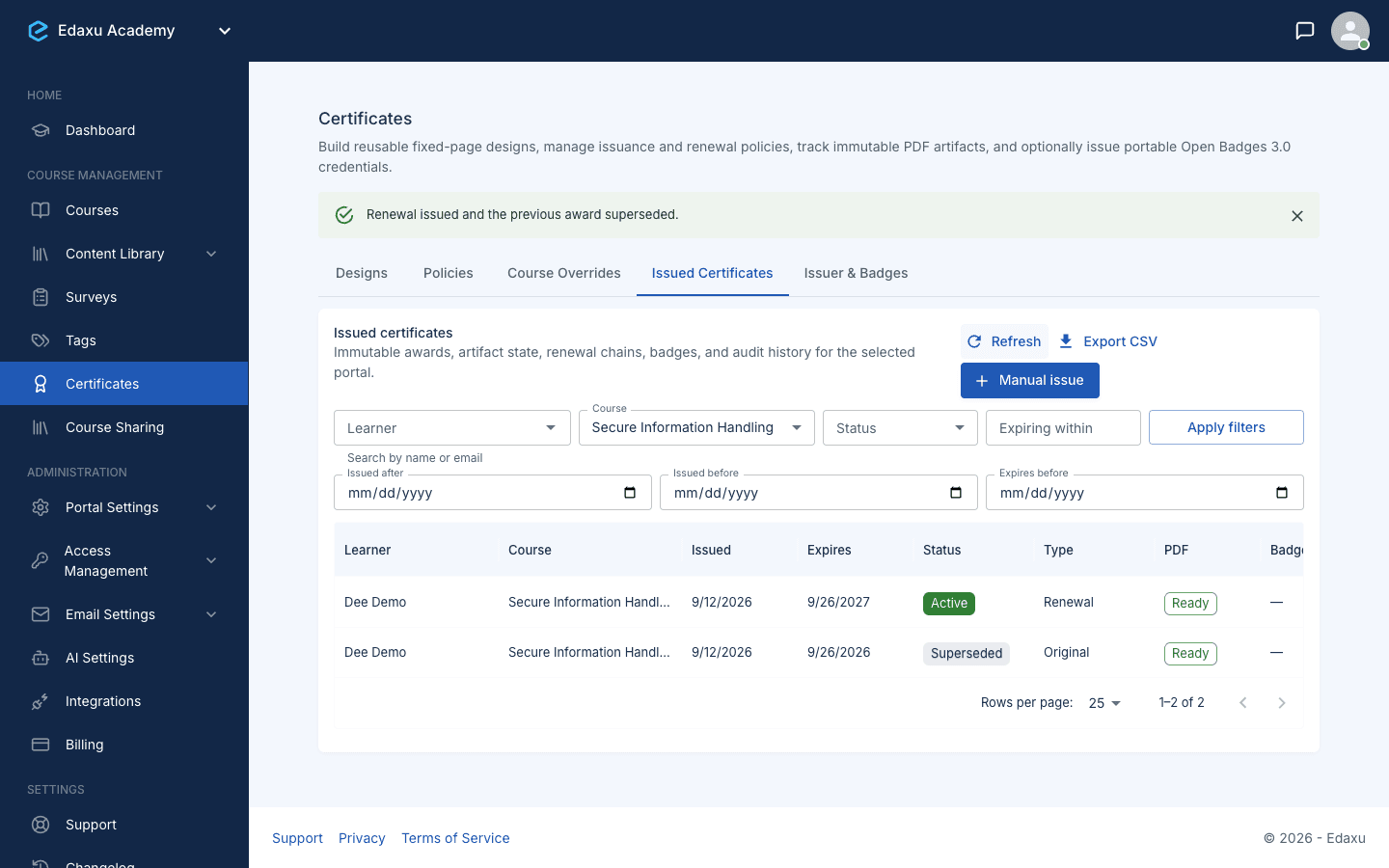
Review an expiring award, issue its renewal, and keep both records connected. Issued PDFs retain their original design and values.

edaxu certificate history showing an active renewal linked to a superseded original certificate for a demo learner
Actual edaxu certificate history, using demo learner data. The renewed award and original remain visible.
Watch the complete expiration and renewal walkthrough →
ONE CERTIFICATION WORKFLOW

Set the rules. Follow every award.

01 / ISSUE

Certificates that carry your name.

Design branded certificates and issue them manually or after course completion. Give recipients a stored PDF and a public verification link.

02 / RENEW

Define the next cycle.

Set certificate expiration, renewal windows, and reminders. Configure eligible course recompletion or manage renewals from award history.

03 / VERIFY

Preserve what was issued.

Keep original award files and linked renewal records. Handle corrections, replacements, and revocations without losing the earlier record.

EXPIRATION TRACKING

Know who expires in the next 30 days, before anyone lapses.

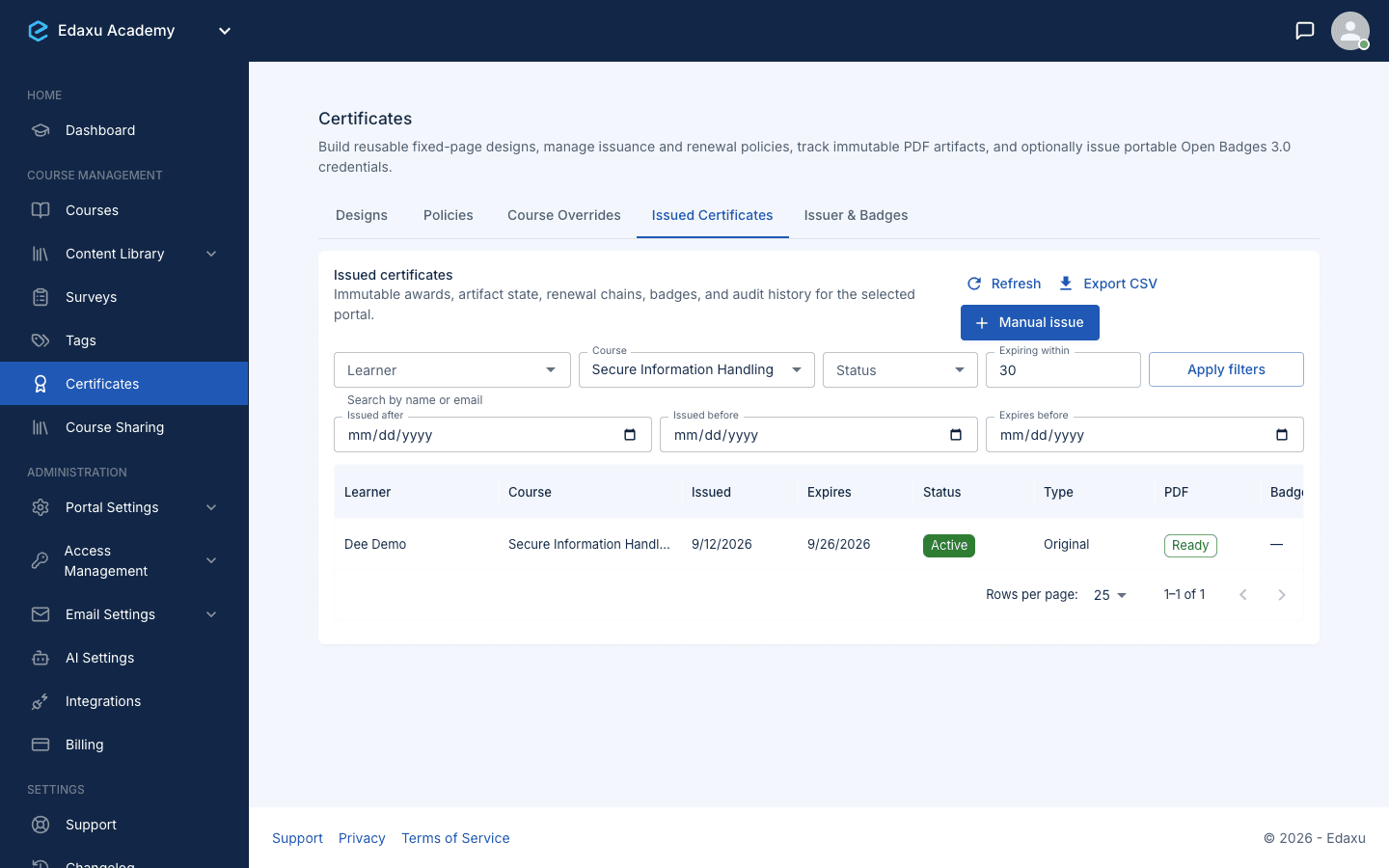
Every award gets its expiry date from the certificate policy when it is issued. Filter issued certificates by learner, course, status, or days until expiry, and work through the list while there is still time to renew.
  • Set validity in months, or leave it blank for certificates that never expire.
  • Filter by any window, such as the next 30, 60, or 90 days.
  • Narrow the list by issue date or expiry date when you need a specific period.
Add certificate expiry to a weekly reporting routine →
edaxu issued certificates list filtered to one course and awards expiring within 30 days, showing one active award for a demo learner
Demo data: the issued certificates list filtered to awards expiring within 30 days.
RENEWAL POLICY AND REMINDERS

Write the renewal rule once. Apply it to every award.

A portal policy sets the default for every course, and a course can override it when a credential needs different rules. Reminders tell people a renewal is due. The renewal itself happens only when the requirement is met.
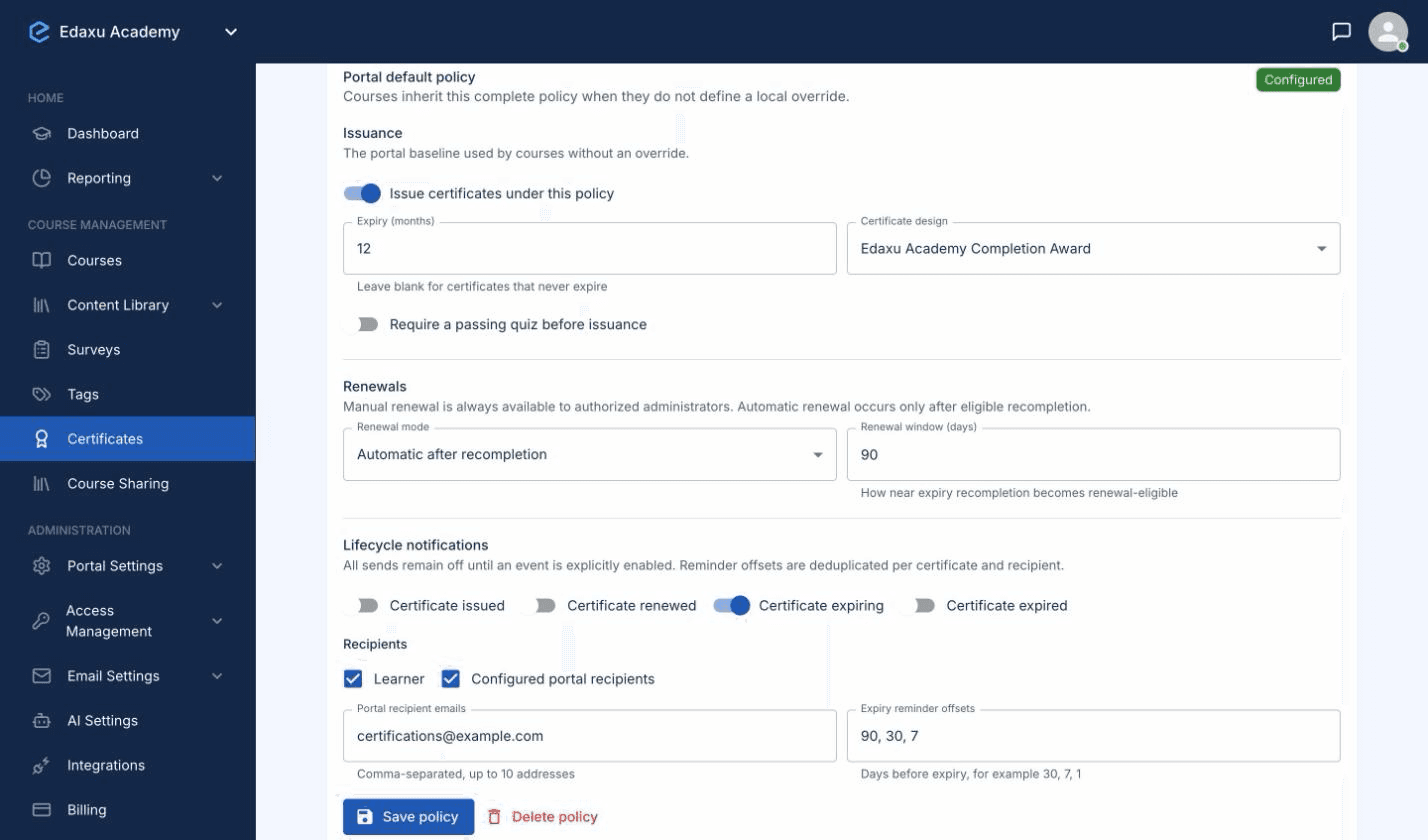
  • Renew manually, or automatically when a learner recompletes the course inside the renewal window.
  • Send expiry reminders on up to ten days you choose, such as 90, 30, and 7 days before expiry.
  • Send them to the learner, to up to ten staff addresses, or both.
  • Require a passing quiz before a certificate is issued.
Read how a recertification cycle runs in edaxu →
edaxu certificate policy with a 12-month expiry, automatic renewal after recompletion inside a 90-day window, and expiry reminders at 90, 30, and 7 days
A demo portal policy: 12-month expiry, automatic renewal inside a 90-day window, and reminders at 90, 30, and 7 days.
PUBLIC VERIFICATION

Let anyone check a certificate. No account needed.

Every issued certificate has a public verification page. An employer, client, or auditor opens the link or scans the QR code on the PDF and reads the record without signing in.
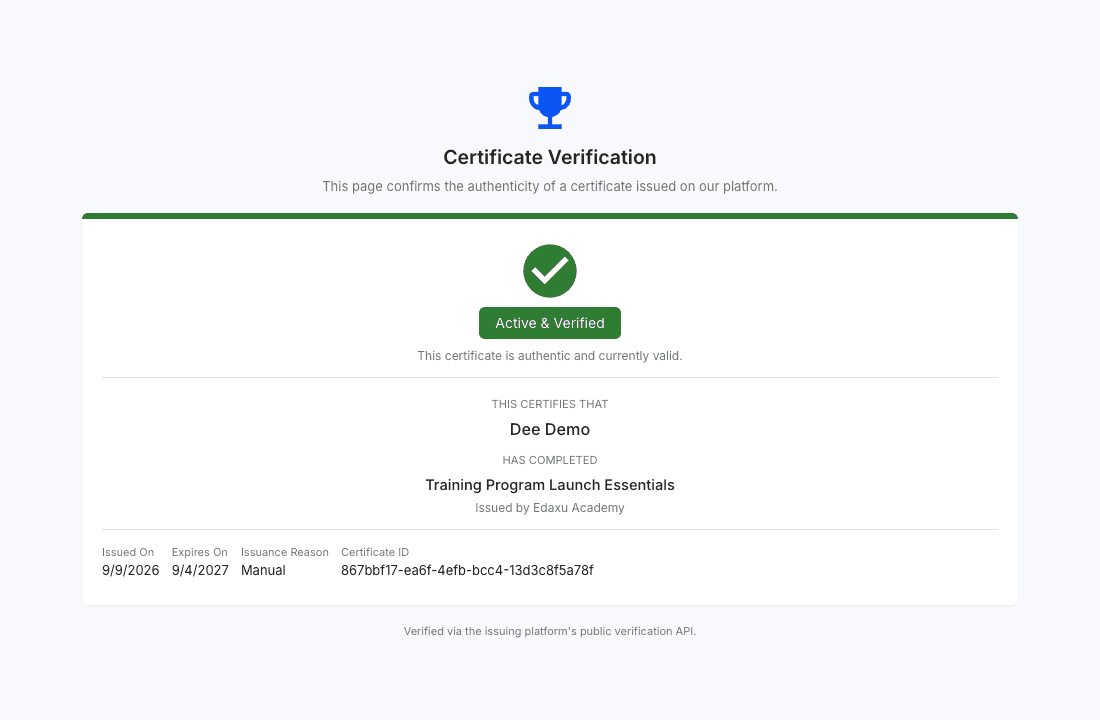
  • Shows the holder, course, issuer, issue and expiry dates, issuance reason, and certificate ID.
  • Shows the award's current status alongside its dates.
  • Optionally issue an Open Badges 3.0 credential with the PDF.
edaxu public certificate verification page showing an active, verified demo award with its issue date, expiry date, issuance reason, and certificate ID
The public verification page for a demo award.
STATUS, HISTORY, AND EXPORT

Keep every award, and the reason it changed.

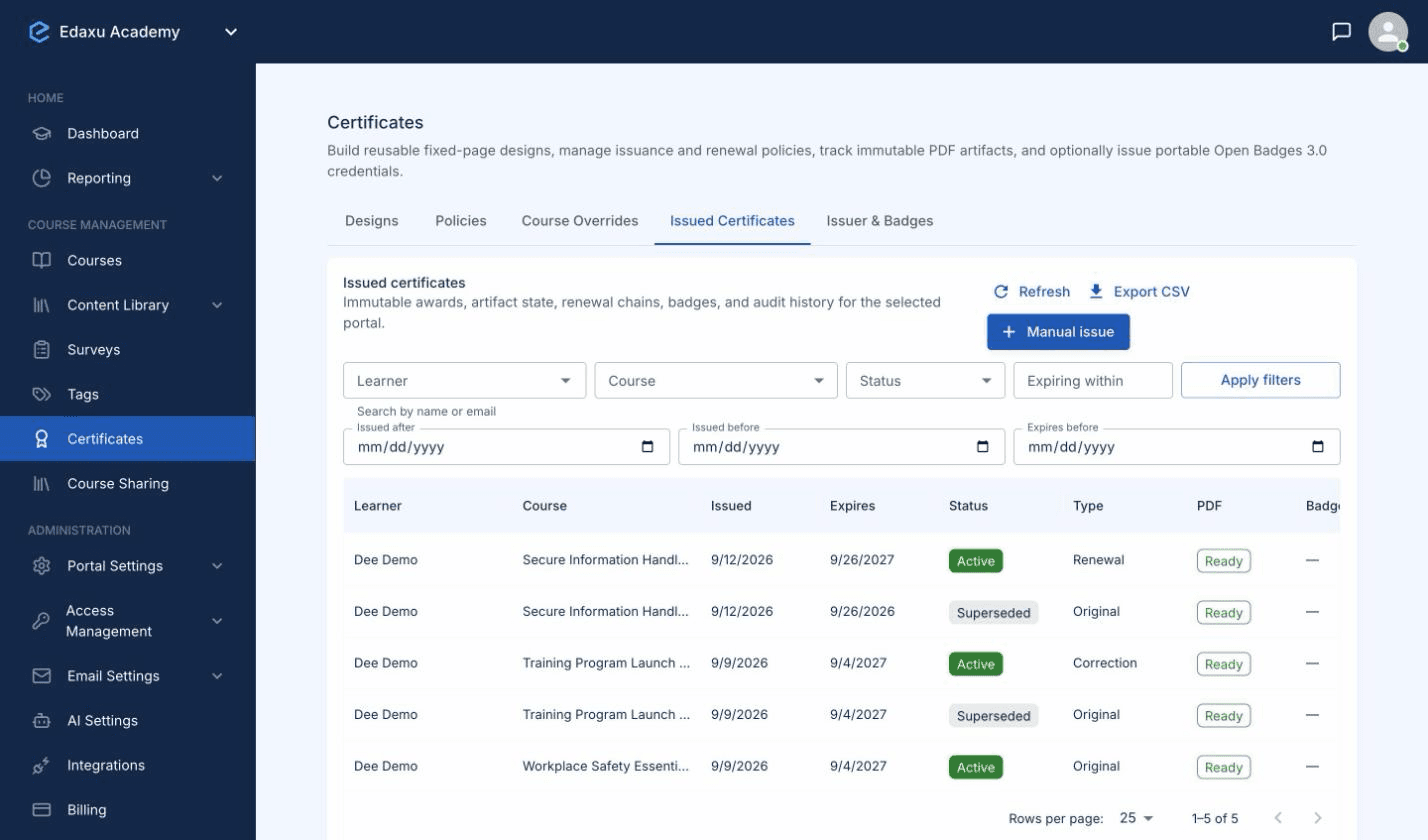
A renewal, correction, or replacement creates a new award and marks the earlier one superseded. Nothing is overwritten, so you can show who was certified on a given date and who decided it.
  • Four statuses: active, expired, superseded, and revoked.
  • Lifecycle history records what happened to an award, which account did it, and when.
  • The issued PDF is stored unchanged with a checksum, even after the design changes.
  • Export certificate records to CSV for an auditor or another system.
edaxu issued certificates list showing active renewal and correction awards beside the superseded originals, with an Export CSV action
Demo data: active renewals and corrections listed beside the superseded originals.
WHERE EDAXU FITS

An LMS that tracks the certificates it issues.

Several kinds of product are sold as certification software. edaxu is a learning management system: it delivers the training, then manages the certificate that follows.

A good fit when

  • You deliver the training and issue a certificate when it is complete.
  • Certificates expire, and are renewed by retaking a course or by an administrator's decision.
  • Employers, clients, or auditors need to verify an award on their own.
  • Each client or team needs its own portal with its own certificate policy.

Plan for another tool when

  • Renewal depends on CE credit totals or category caps. edaxu has no CE-credit ledger; it can send completion and certificate events to your CE system through webhooks or Zapier.
  • You review applications and eligibility for a professional credential before anyone trains.
  • You track licenses that a state board or another outside body issues to your staff.
  • You need a built-in grace period after expiry. edaxu has no grace-period setting, so late renewals go through an administrator.
Comparing tools? Read the certification management software buyer's guide and its 12-point checklist →
TRY YOUR OWN PROGRAM

Bring one course.
Test one complete renewal.

Upload your training, create a certificate, configure a policy, and follow a demo learner through issuance and renewal.

BEFORE YOU START

A few practical questions.

What is certification tracking software?

Certification tracking software records who holds which certificate, when each one expires, and what has to happen to renew it. edaxu does this for the certificates your courses award, and adds renewal reminders, award history, and public verification.

Who is edaxu built for?

Training providers, professional associations, and internal training teams that deliver learning, issue certificates, and manage expiration and renewal policies.

How does edaxu track certification expiration dates?

A certificate policy sets the validity period in months, and each award gets its expiry date when it is issued. edaxu counts a month as 30 days from the issue date. Administrators filter issued certificates by days until expiry, and reminder emails go out on the days you choose.

Can edaxu renew certifications automatically?

Yes, when renewal means retaking a course. With automatic renewal turned on, edaxu issues a new award when a learner recompletes the course inside the renewal window before expiry. Recompleting earlier than the window does not renew. An administrator can also renew an award manually and record the reason.

What happens when a certificate is renewed?

An administrator renewal creates a new award linked to the previous one. The earlier record remains in certificate history. You can also configure renewal after eligible course recompletion.

Can someone verify an issued certificate?

Yes. Issued certificates have stored PDFs and public verification links. Certificate designs can include a verification QR code.

Can I bring existing courses?

Yes. edaxu supports SCORM 1.2 and SCORM 2004, as well as videos, PDFs, presentations, files, and native quizzes. Scope any historical learner and certificate migration with us before implementation.

Does edaxu track continuing education credits?

edaxu manages course certificates and renewal policies. It does not currently provide a CE-credit ledger or credit-based renewal requirements.

What is included in the trial?

The 30-day trial includes the core platform and 3 team portals, with up to 50 active learners shared across your workspace and portals. No credit card is required.